As we continue to move away from standard definition to HD High-Definition from our Televisions to our phones, the security industry has also begun integrating HD into surveillance applications. We got a chance to speak with Annie Wu from Everfocus about these new HD DVR's and what's so great about them. Take a look:
Capture scenes with stunning HD clarity and get uncompressed full motion MEGAPIXEL DIGITAL video over standard coaxial cable. Attach familiar BNC connectors on the HD CCTV cameras and HD DVR, then display live and recorded images in astounding detail on the HDMI main monitor screen. Get HD 1080p with 6 times the resolution of traditional cameras to deliver the ability to zoom with clarity.
If your looking to upgrade your old analog system, Everfocus has two great DVR options for you. A hybrid solution gives you the flexibility of installing a handful of HD cameras to cover certain areas, while using the rest of the ports for traditional analog cameras. A full HD DVR solution is also offered to cover all your camera locations in High Definition.
Excellent choice for upgrading your current CCTV location because you can use your existing coax cable versus an IP camera solution that requires new cabling and networking. Get Superior 2-Megapixel/1080i and 1-Megapixel/720p quality over existing coaxial cable! HD CCTV provides unmatched clarity and Vivid Detail even while zooming in on live and playback. Call a Discount-Low-Voltage.com sales professional today to get your custom HD CCTV solution started. It's easier than you might think.
(888) 797-3697
Related Posts:
How to View Security System DVR with Your Cell Phone - iPhone - Blackberry
Ideal SecuriTEST Pro CCTV Security Camera Tester
DVR Frames Per Second Comparison Video
CCTV Glossary of Common Terms and Definitions
Everfocus EN220 Security Camera Monitor Test Kit
Monday, August 8, 2011


Friday, August 5, 2011
How To Terminate Cat6A Keystone Jacks - Video and Pictures
Cat6a keystone jacks and cat6a cabling are not much different than regular cat6 products, but do require a little extra attention to detail. The individual pairs in cat6a cable are twisted much tighter, and need to remain that way all the way up to the termination point. If the pairs are untwisted, you may not get your cable to pass the certification tester. In today's blog, we'll take you step-by-step through the process of terminating cat6a keystone jacks, using cat6a cabling. To get started, let's make sure you have the necessary tools:

You'll Need:
Cat6a Keystone Jacks
Cat6a Bulk Cable
Punch Down Tool
110 Blade for Punch Tool
Electricians Scissors
Keystone Jack Palm Puck (optional)
Step 1) Strip off about 2-3 inches of the cable jacket

Step 2) Pull the 4 pairs of cable back, and remove the center divider (spline)

Step 3) Each Cat6a jack has the 568a and 568b wiring diagram chart on it. We will be using the most commonly used, 568b wiring diagram.

Step 4) Lace up all 4 pairs of cable on the cat6a jack, remembering to follow the 568b diagram

Step 5) Punch down wires onto keystone jack using the punch down tool and 110 blade. Make sure the side that says "Cut" on the 110 blade is pointing towards the outside of the cat6a jack.

Step 6) Put the dust cap cover on the cat6a jack and your done! It can now be inserted into wall plates, surface mount boxes or keystone patch panels.

Related Posts:
Video: How It's Made - Bulk Cat6, Cat5e, Cat3, and OSP Cable
Pictures: How to Terminate Cat6A Shielded Keystone Jacks
Crazy Data Center Wiring Pictures
UL Warning: Counterfeit Cat6 Communications Cable on the Market
UL Requires New Holographic Labels for Low Voltage Communications Cable
You'll Need:
Cat6a Keystone Jacks
Cat6a Bulk Cable
Punch Down Tool
110 Blade for Punch Tool
Electricians Scissors
Keystone Jack Palm Puck (optional)
Now that we have all the right tools, let's terminate some cat6a jacks.
Step 1) Strip off about 2-3 inches of the cable jacket
Step 2) Pull the 4 pairs of cable back, and remove the center divider (spline)
Step 3) Each Cat6a jack has the 568a and 568b wiring diagram chart on it. We will be using the most commonly used, 568b wiring diagram.
Step 4) Lace up all 4 pairs of cable on the cat6a jack, remembering to follow the 568b diagram
Step 5) Punch down wires onto keystone jack using the punch down tool and 110 blade. Make sure the side that says "Cut" on the 110 blade is pointing towards the outside of the cat6a jack.
Step 6) Put the dust cap cover on the cat6a jack and your done! It can now be inserted into wall plates, surface mount boxes or keystone patch panels.
Watch the video: How to Terminate Cat6A Keystone Jacks
Related Posts:
Video: How It's Made - Bulk Cat6, Cat5e, Cat3, and OSP Cable
Pictures: How to Terminate Cat6A Shielded Keystone Jacks
Crazy Data Center Wiring Pictures
UL Warning: Counterfeit Cat6 Communications Cable on the Market
UL Requires New Holographic Labels for Low Voltage Communications Cable
Wednesday, August 3, 2011
Fiber Optic Visual Fault Finder - AFL HiLite Product Video

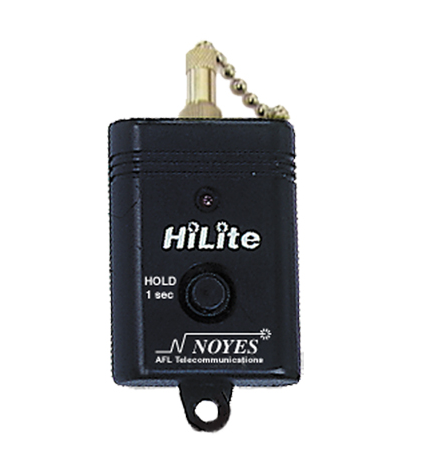
The AFL HiLite fiber optic visual fault finder is the star of this weeks Product Video Blog.
First, some information on visual fault finders:
Fault finders are designed to troubleshoot faults on fiber optic cables by sending a red laser beam through the fiber optic cable. Light generated by these units will escape from sharp bends and breaks in jacketed or bare fibers, as well as poorly mated connectors. They can identify faults in fiber optic jumper cables, distribution frames, patch panels, and splice trays. In addition, they can also be used to aid installation of AFL FAST fiber optic connectors.
Watch the Video!
Features and Benefits of the AFL HiLite:
- Compact, lightweight size
- Visible red laser source, 650 nm
- Easily locate faults in fiber optic cable, fiber jumpers, and more
- Includes 2.5mm adapter for popular SC and ST fiber optic connectors
- High power, 1 mW
- Universal connector interface for quick connection
- Easy to order from Discount-Low-Voltage.com

Related Posts:
Video: How It's Made - Fiber Optic Cable
Video: How To Terminate Fiber Optic Cable Using AFL FAST Connectors
Tutorial: Difference Between Loose Tube Fiber Optic Cable and Tight Buffered Fiber Cable
Whitepaper: Fiber Optic 10 Gigabit Ethernet Technology Overview
FAQ: Glossary of Common Fiber Optic Terms (A-E)
Monday, August 1, 2011
Industrial Cat5e Bulk Cable Solution for Mobile MRI Machines
Rick Dressel from Alliance HealthCare Services came to us looking for a solution to connect his mobile MRI machine to the clients Hospital. Alliance Imaging provides mobile MRI, PET/CT and CT, in addition to state-of-the-art dedicated breast MRI systems.

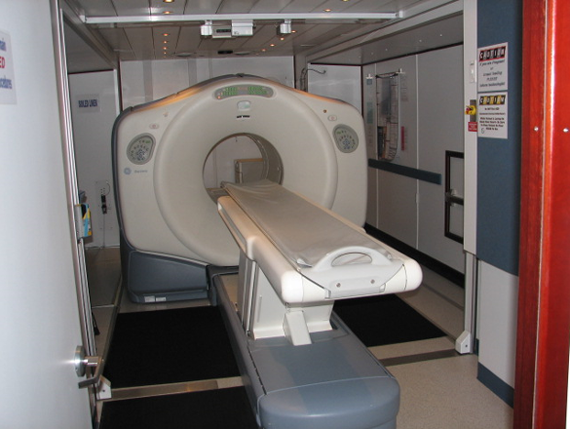
Rick had problems with previous cabling he was using. He started with a traditional solid conductor Cat5e PVC indoor cable. Unfortunately, over time he had to constantly replace these cables due to the repeated exposure to UV rays and harsh weather elements. In addition, the cable jacket was being torn up from repeated contact with the ground.

His next cable selection was a Cat5e solid direct burial cable. Although this cable is meant to stand up to the elements, it is gel filled, making working with this cable a hassle. The drag on different surfaces also eventually ate through the jacket.
We made the recommendation of using Datamax Extreme Cat5e Cable. This Quabbin 5730R cat5e cable has a polyurethane jacket, aluminum shield, and drain wire for superior harsh environment conditions. This cable uses a stranded conductor design, providing the flexibility Rick needed. Having sold this cable to production studios, we knew the DataMax Extreme cat5e cable would withstand the constant abuse. After having this cable installed on Rick's mobile MRI, here's what he had to say:
"Mr. Mercy Salinas, thank you for your expert knowledge in finding the perfect cat-5 cable, for our application. The Quabbin 5730R is exceeding far beyond expectations. I believe this cable will last in a outdoor environment for years. Any company using cat-5 in a outdoors environment, should try this cable. Thank you again for all of your help." - Rick Dressel
Related Posts:
Video: Bulk Cat5e Cable and Bulk Cat5e Shielded Cable
Video: How It's Made - Low Voltage Cable (Cat3, Cat5e, Cat6, OSP)
Video/Pictures: How to Terminate Cat5e and Cat6 Kwik Jacks
Update: UL Requires New Holographic Labels for Bulk Cable
Video/Pictures: How to Make Ethernet Cat5e Cables
Rick had problems with previous cabling he was using. He started with a traditional solid conductor Cat5e PVC indoor cable. Unfortunately, over time he had to constantly replace these cables due to the repeated exposure to UV rays and harsh weather elements. In addition, the cable jacket was being torn up from repeated contact with the ground.
His next cable selection was a Cat5e solid direct burial cable. Although this cable is meant to stand up to the elements, it is gel filled, making working with this cable a hassle. The drag on different surfaces also eventually ate through the jacket.
We made the recommendation of using Datamax Extreme Cat5e Cable. This Quabbin 5730R cat5e cable has a polyurethane jacket, aluminum shield, and drain wire for superior harsh environment conditions. This cable uses a stranded conductor design, providing the flexibility Rick needed. Having sold this cable to production studios, we knew the DataMax Extreme cat5e cable would withstand the constant abuse. After having this cable installed on Rick's mobile MRI, here's what he had to say:
"Mr. Mercy Salinas, thank you for your expert knowledge in finding the perfect cat-5 cable, for our application. The Quabbin 5730R is exceeding far beyond expectations. I believe this cable will last in a outdoor environment for years. Any company using cat-5 in a outdoors environment, should try this cable. Thank you again for all of your help." - Rick Dressel
Related Posts:
Video: Bulk Cat5e Cable and Bulk Cat5e Shielded Cable
Video: How It's Made - Low Voltage Cable (Cat3, Cat5e, Cat6, OSP)
Video/Pictures: How to Terminate Cat5e and Cat6 Kwik Jacks
Update: UL Requires New Holographic Labels for Bulk Cable
Video/Pictures: How to Make Ethernet Cat5e Cables
Friday, July 1, 2011
32" LCD Flat Screen TV Giveaway Details - July/August 2011
Hannspree 32" LCD Flat Screen TV Giveaway

Experience high definition in a whole new way. FREE! This Discount-Low-Voltage.com giveaway features a 32" LCD flat screen TV from Hannspree. Plus, were throwing in the LCD wall-mount bracket for free as well. This 32" HDTV features a sleek black design, High definition 720p display format, 2 HDMI ports, and much more. How can I get this awesome TV in my hands you ask? Easy. Watch this video or check out the instructions below.
How To Enter:
Giveaway Ended August 31st, 2011
1) To earn an entry into the giveaway, simply visit http://www.resellerratings.com/store/survey/Discount_Low_Voltage and write a review of your experience at Discount-Low-Voltage.com between July 1st 2011 and August 31st 2011.
That's it.
Never bought anything at Discount-Low-Voltage.com before? Well get over there and make a purchase. Any size order gets you into the giveaway. What if I already wrote a review of Discount-Low-Voltage.com on ResellerRatings? Simple, go back to your review and update it with something new.
Make a purchase. Write a review. Win a rad LCD TV.
For full contest rules, visit 32" TV Giveaway Rules and Regulations
Things to Remember:
- The review must be written between July 1st and August 31st, 2011
- Were also giving away a $50 and $25 Discount-Low-Voltage.com Gift Card
- You MUST use a valid email address!
Subscribe to:
Posts (Atom)