Showing posts with label Cat5e. Show all posts

Monday, May 13, 2013

Superior Essex Cat5e Shielded Aluminum vs. Copper Shield

I recently did a video on a Essex cable with a copper shield and not to long ago I did what I though was the same cable but with a aluminum shield, let's take the red pill and dig into these cables.


The cables compared are part of the Superior Essex BBDe series of OSP (Outside Plant) cables. More specifically the part number for the aluminum is 04-601-54 and the copper is 04-601-55.

Both of these cables are designed to provide extension of the LAN beyond the premise, core is filled with a PFM gel to prevent water ingress and won't drip down in vertical cable run installations. Applications for both these cables are the same, 10BASE-T through 1000BASE-T, ATM and token ring, WiMAX cell towers.

Let's go over what the features are for both cables.

* Cat5e transmission performance to 350mhz
* Shield provides EMI/RFI prtection
* UV sunlight resistant black jacket
* Dry water block between shield and core

Let's visually look at these cables from our YouTube channel.


So these cables are the same except the shield, what shield is the correct shield for your installation? Let's compare.

Part number 04-601-54 the aluminum shield has a electrically continuous polymer coated smooth aluminum tape, applied with an overlap. Essex specifies this cable to be installed in lashed aerial, underground conduit and "low risk" direct burial installation.

Part number 04-604-55 the copper shield has a electrically continuous corrugated copper clad armor, applied with an overlap shield and flooded with a flooded compound. Where to install this cable is the same but essex specifies this cable as "rodent proof".

Certain areas are more exposed to those cute rodents so if that's a big concern for you go with the copper shield. Actually after comparing pricing per foot there's not much of a price difference, might as well install the copper shield.

"By Mercy Salinas"

Tuesday, April 23, 2013

Dressing your Cat5e, Cat6 data cabling so it looks sexy!

When you start your data cabling do it right from the beginning before it gets out of hand. Here's a couple of examples to avoid before you start pulling your hair out!


If your cabling gets this bad you better hope there's a building remodel before a network remodel. The cost of having network cabling reorganized when it gets this bad is so expensive you might as well upgrade your existing network.

There's a simple, easy and inexpensive tool to help you avoid the point of no return. A Cable Comb.


It's so easy to use, so save yourself the headache in the long run and keep this cool tool on hand in the telecom closet. Maybe lock it up, tools never end up where you left them.

"By Mercy Salinas"

Tuesday, April 2, 2013

Cable management ties for Cat5e, Cat6, Cat6A and Fiber Cable

Tightening cable ties on data cables too much will hurt the physical properties and performance.


You should be using the Caddy Mille-Tie.


This tie is most commonly used for bundling high-performance copper and fiber cables but is also used for innerduct in cable trays, surface raceways, service poles and in wall cabling. Don't squeeze your data pipe and do it right!

"By Mercy Salinas"


Friday, December 14, 2012

Network cable qualification tester vs. certification tester

I get sucked into this discussion constantly and it always ends up being a long conversation that goes round and round and ends up going nowhere.

Our good buddy Ron with Ideal Industries discusses the differences of a qualifier vs certifier when the quality of your network cabling is in question.


Did you notice the standards chart did not include "Cat5 Big E" or "Cat5e 350mhz"? Did you find a standard for "Cat6E"? Those are probably topics that you'll have to educate your customer on.

Questions, comments? Leave them below.

"By Mercy Salinas"   

Monday, August 6, 2012

Cat5e Cable for Cell Tower and Outdoor Wireless Installations

As you know cell tower and outdoor wireless equipment installations can be some of the most demanding and dangerous. Contractors for these installations face many pressures from meeting a deadline, proper materials, making sure the job is done correctly and doing everything with a safety first mentality.

We can't help you with everything your going to bump into at your installation but we can help with getting you proper materials for your installation in a timely manner to help meet your deadline.

One product that comes to mind is the BBDE serise of outside plant cable by Superior Essex.


* This cable is built with a dry water blocking agent outside of the inner jacket that helps prevent  water ingress between shield in inner cable preventing damage to equipment.

* The core is fully filled with PFM Gel allowing for a no drip or flow in vertical installations, also helps fight against degraded transmission performance.

* Outside plant rated sunlight resistant black jacket will allow for years and years of reliable performance.

With these features and the reliability of a company that has been making cable since 1930 you can rest assure the quality of this cable is as good as your installation.

You can order this cable at Discount Low Voltagee

"By Mercy Salinas"

Wednesday, December 7, 2011

Bulk Cat5e 25 Pair Indoor/Outdoor Cable Video


Features and Benefits of the Superior Essex Cat5e 25 Pair Cable:
- Made in the USA
- Allows installation at -20°C temperatures
- Small outside diameter
- Capable of 1000BASE-T
- Black, CM rated, non-haolgen, OSP grade jacket material
- Vibrant insulation colors
- Compliant to ANSI/TIA-568-C.2 for CAT 5e
- Easy to order from Discount-Low-Voltage.com


Related Posts:

Tuesday, September 6, 2011

500ft Bulk Cat5e Cable - Bravo Paks


The 500ft Bulk Cat5e Bravo Pak is the star of this weeks Product Video Blog.

This 500ft bulk cat5e cable works great with:
- The Kwik Jack System
- Dynacom Cat5e 110 Patch Panels
- RJ45 Modular Plugs


Watch the Video!


Features and Benefits of the 500ft Bulk Cat5e Bravo Pak Cable:
- Short 500ft length for small jobs
- Less Waste
- Easy to pull, never kinks
- UL Listed and RoHS Compliant
- Great for making custom length ethernet patch cords
- In stock now!
- Easy to order from Discount-Low-Voltage.com


Related Posts:

Monday, August 22, 2011

Contractor Testimonial: Cat3, Cat5e, and Cat6 KWIK System

We've been bragging about how good the KWIK System is and how much time and cost of labor can be saved at the job-site, but don't take it from us, take it from a contractor himself!

Doug Lynn from All Cal Communications has been doing low voltage installation work since 1989, and has worked with a wide spectrum of cables. In addition, he regularly works with and installs Panasonic phone systems. Let's see what he had to say about the Kwik Tool and Kwik Jacks:


So what else makes the Kwik System so cool besides saving time and cost on labor?

- The same cutting head is used for the Cat3, Cat5e and Cat6 keystone jacks. The cutting head is good for at least 1000 terminations, and an additional cutting head is included free of charge.

- Excellent cable test/certification results, so printed reports for your customers are a breeze. No additional labor in troubleshooting is accrued.

- Count on quality! Ever go back to a job-site to troubleshoot a keystone jack that was working when you left? Not with the KWIK jack, once it's done, it's done.

- 25 year TIA/EIA smart link performance warranty is an excellent offering for Hospitals, Military, Government and fortune 500 companies.

- The "High Density" design allows for a wide selection of applications; such as: modular furniture face plates, decora wall plates, and high density keystone patch panels. Saves valuable space.

- No split pairs! No split pair design saves time when lacing the wires onto the keystone jack.

- Color coded for 568B and 568A. Cat3 is colored for USOC wiring. Great for the new guy or home DIYer who always forgets the color code.

- UL and RoHS listed.

- 10 different colors available (Almond, Black, Blue, Gray, Green, Ivory, Orange, Red, Yellow, White).

All that and you get to work with a company that has been offering solutions for over 10 years. Sounds to me like you have a win win : )


Order all the Kwik Tool and Kwik Jacks online at Discount-Low-Voltage.com/The-Kwik-Jack-System

Or by phone (888) 797-3697 

Related Posts:
Video: How To Terminate Cat5e/Cat6 Kwik Jacks Using the Kwik Tool
August 2011 32" Flat Screen TV Sweepstakes
Pictures/Video: How To Terminate Cat6A Keystone Jacks
How To Punch Down Cat5e/Cat6 Keystone Jacks Using 110 Punch Tool
Free Kwik Tool - Deal of the Week

Monday, August 1, 2011

Industrial Cat5e Bulk Cable Solution for Mobile MRI Machines

Rick Dressel from Alliance HealthCare Services came to us looking for a solution to connect his mobile MRI machine to the clients Hospital. Alliance Imaging provides mobile MRI, PET/CT and CT, in addition to state-of-the-art dedicated breast MRI systems.


Rick had problems with previous cabling he was using. He started with a traditional solid conductor Cat5e PVC indoor cable. Unfortunately, over time he had to constantly replace these cables due to the repeated exposure to UV rays and harsh weather elements. In addition, the cable jacket was being torn up from repeated contact with the ground.


His next cable selection was a Cat5e solid direct burial cable. Although this cable is meant to stand up to the elements, it is gel filled, making working with this cable a hassle. The drag on different surfaces also eventually ate through the jacket.

We made the recommendation of using Datamax Extreme Cat5e Cable. This Quabbin 5730R cat5e cable has a polyurethane jacket, aluminum shield, and drain wire for superior harsh environment conditions. This cable uses a stranded conductor design, providing the flexibility Rick needed. Having sold this cable to production studios, we knew the DataMax Extreme cat5e cable would withstand the constant abuse. After having this cable installed on Rick's mobile MRI, here's what he had to say:

"Mr. Mercy Salinas, thank you for your expert knowledge in finding the perfect cat-5 cable, for our application. The Quabbin 5730R is exceeding far beyond expectations. I believe this cable will last in a outdoor environment for years. Any company using cat-5 in a outdoors environment, should try this cable. Thank you again for all of your help." - Rick Dressel


Related Posts:

Video: Bulk Cat5e Cable and Bulk Cat5e Shielded Cable
Video: How It's Made - Low Voltage Cable (Cat3, Cat5e, Cat6, OSP)
Video/Pictures: How to Terminate Cat5e and Cat6 Kwik Jacks
Update: UL Requires New Holographic Labels for Bulk Cable
Video/Pictures: How to Make Ethernet Cat5e Cables

Wednesday, February 16, 2011

UL Requires New Holographic Labels for Communications Cable


To further enhance the integrity of the UL Mark, UL is introducing a holographic label requirement for a wide variety of cable categories. The new UL Marks include the use of secure golden holographic label material and color shifting inks to prevent unauthorized label reproduction.

This type of label has been proven an effective tool in deterring counterfeit products from entering the marketplace. Effective October 1, 2010 manufacturers will be required to apply holographic UL Marks for the products noted below. Although the holographic label is new, the remaining engineering marking information provided on the cable tags or reels and the methods for applying these markings remain unchanged.

• Communications Cable (DUZX/DUZX7)
• Communications Cable Verified to UL Performance Category Program (DUZX)
• Data Transmission Cable Verified in Accordance With National or International Specifications (DVBI)
• Community Antenna Television Cable (DVCS)
• Data Processing Cable (EMRB)
• Non-Power-Limited Fire-Alarm Cable (HNHT)
• Power-Limited Fire-Alarm Cable (HNIR / HNIR7)
• Instrumentation Tray Cable (NYTT)
• Network Powered Broadband Communications Cable (PWIP)
• Optical Fiber Cable (QAYK/QAYK7)
• Power Limited Circuit Cable (QPTZ)

Code authorities have already begun to see cables with the new holographic labels during their inspections, and will see an increasing number of cables with these markings in the future. You can expect to see the UL symbol on the product and the new holographic UL Listing Mark on the attached tag, the reel, or the smallest unit container in which the cable is packaged. The UL symbol will still appear on the surface print of the cable, and can be either the complete UL in a circle, or the letters “UL” in parenthesis “(UL)”. Surface printing of the UL Certification Mark on the wire insulation or jacketed material is only permissible when the accompanying reel or smallest unit container is also provided with the UL holographic Listing Mark. Although manufacturers cannot add non-holographic labels to cable after October 1, 2010, it may take a while for cable with the non-holographic Listing Marks to be cleared from the supply chain.


An example of the UL holographic label on Cat5e Bulk Communications Cable offered at Discount-Low-Voltage.com


Related Posts:
UL Warns About Counterfeit Communications Cable
UL Finds Performance & Safety Issues Found in Offshore Communications Cable
How Low Voltage Communications Cable is Made - Cat3, Cat5e, Cat6, OSP
25 Pair Cat3 Telephone Communications Cable Video
What is Plenum Communications Cable and When Should I use It
How To Make an Ethernet Cat5e/Cat6 Cable

Thursday, April 8, 2010

New Videos - Bulk Cat5e Cable at Discount-Low-Voltage.com

Check out the new product videos we did on Bulk Cat5e cable and Cat5e Shielded Cable. The cat5e cable comes in 1,000ft pull boxes and features the Reelex cone inside. These Reelex boxes reduce tangles while pulling cable, which increases your productivity. The shielded cat5e cable comes on a durable wooden spool. For more information on both products, click the links above or visit Discount-Low-Voltage.com.


Bulk Cat5e Cable Video


Bulk Cat5e Shielded Cable


Related Posts:
Bulk Cat5e Cable Details
How To Make an Ethernet Cat5e/Cat6 Patch Cable
Standard 568b Wiring Diagram
Crazy Cat5e Wiring - INSANE!!!
How It's Made - Cat5e Low Voltage Cable Video

Monday, February 8, 2010

Free Kwik Tool - Deal of the Week


This weeks Deal of the Week features the Dynacom Kwik Tool. Now until Friday the 12th, 2010, were giving you a FREE Kwik Tool with any order of 50 or more Kwik Jacks. Simply use coupon code FREEWITH50 when placing your order, and we'll cover the cost of the Kwik Tool. That's a savings of $29.96. Plus, you'll save up to 30% on installation time when using the Kwik Tool. This offer is only good until the end of the week, so place your order now. Visit Discount-Low-Voltage.com/The-Kwik-Jack-System to order online, or call us at (888) 797-3697.

Here's a video we did with instructions on how to terminate a Cat5e keystone jack (110 type) and a Cat5e Kwik Jack using the Kwik Tool. Enjoy


Features:
* The Kwik-Tool and Kwik-Jack are priced competitively with regular jacks
* Much faster than 110 tool
* The Kwik-Jack will save you up to 30% of your termination time when used with the Kwik-Tool. You can also use a regular 110 tool if no Kwik-Tool is available
* Uses SureLock Retention Technology for a perfect termination
* Cat3, Cat5e and Cat6 in stock. All use the same tool
* Using the Kwik-Jack Termination System ensures high-quality installations and high performance test results

Related Posts:
Bulk Cat5e Cable - 4 Pair CMR 1000ft Pull Box
How To Terminate Cat5e & Cat6 Kwik Jacks Using the Kwik Tool
Standard 568b Wiring Diagram
How To make an Ethernet Cat5e & Cat6 Cable
How It's Made - Low Voltage Cable

We always appreciate customer feedback. Have you ever used the Kwik Tool? We'd like to hear about it. Leave a comment below and tell us about your experience.

Monday, January 4, 2010

MultiMedia Wall Plate - Voice, Cat5e Data & Video


Dynacom MultiMedia Wall Plate for Voice, Cat5e Data & Video

Features:
- All-in-One Voice, Cat5E Data & 1GHz Video Wallplate
- Satin Finish
- Painted Combo Screws Included
- Flame Retardant UL 94V-0 Rated Plastic

Description:
Bring your voice, cat5e data and video together on one easy to install wall plate. These multimedia wall plates by Dynacom come ready to use, with 110 style connectors for your voice and data applications and an F-type connector for your video applications. Installation is easy, simply punch down your voice and data inserts using the color code shown on each connector, twist on your video connector and mount to the wall using the 2 included screws. Don't need the video connector? We also offer a Voice & Data only multimedia wall plate. To order these multimedia wall plates and many other items, visit our website at Discount-Low-Voltage.com

Please take a second and leave a comment below letting us know what your think of these wall plates. Thanks

Related Posts:
How To Punch Down Cat5e/Cat6 Keystone Jacks
Arlington Industries LV1 Drywall Mounting Ring
How To Install Arlington Industries LV1
How Low Voltage Cable is Made
Standard 568b Wiring Diagram

Wednesday, December 2, 2009

How To Terminate Cat5e/Cat6 Kwik Jacks Using the Kwik Tool

The Kwik Jacks and Kwik Tool are the newest addition of keystone jacks to the Discount-Low-Voltage.com lineup. We first introduced them back in January of this year and have had nothing but great feedback for the Kwik Jacks. Today, Im going to show you step-by-step How To Terminate the Cat5e/Cat6 Kwik Jacks. I'll include photos and a video to help you along the way. Let's get started.
Blog Updated 6-15-11: New Kwik Tool design

What You Need:


Electricans Scissors


Now that we have the right tools, lets punch down some keystone jacks

First, strip back the jacket about 1-2". The Cat6 cable (bottom) is larger than the Cat5e cable because it has a center spline, which separates all 4 pairs of wires. This center spline helps reduce Alien Cross-talk.


Cut off the ripcord


Cut off the separator if you're using Cat6 cable


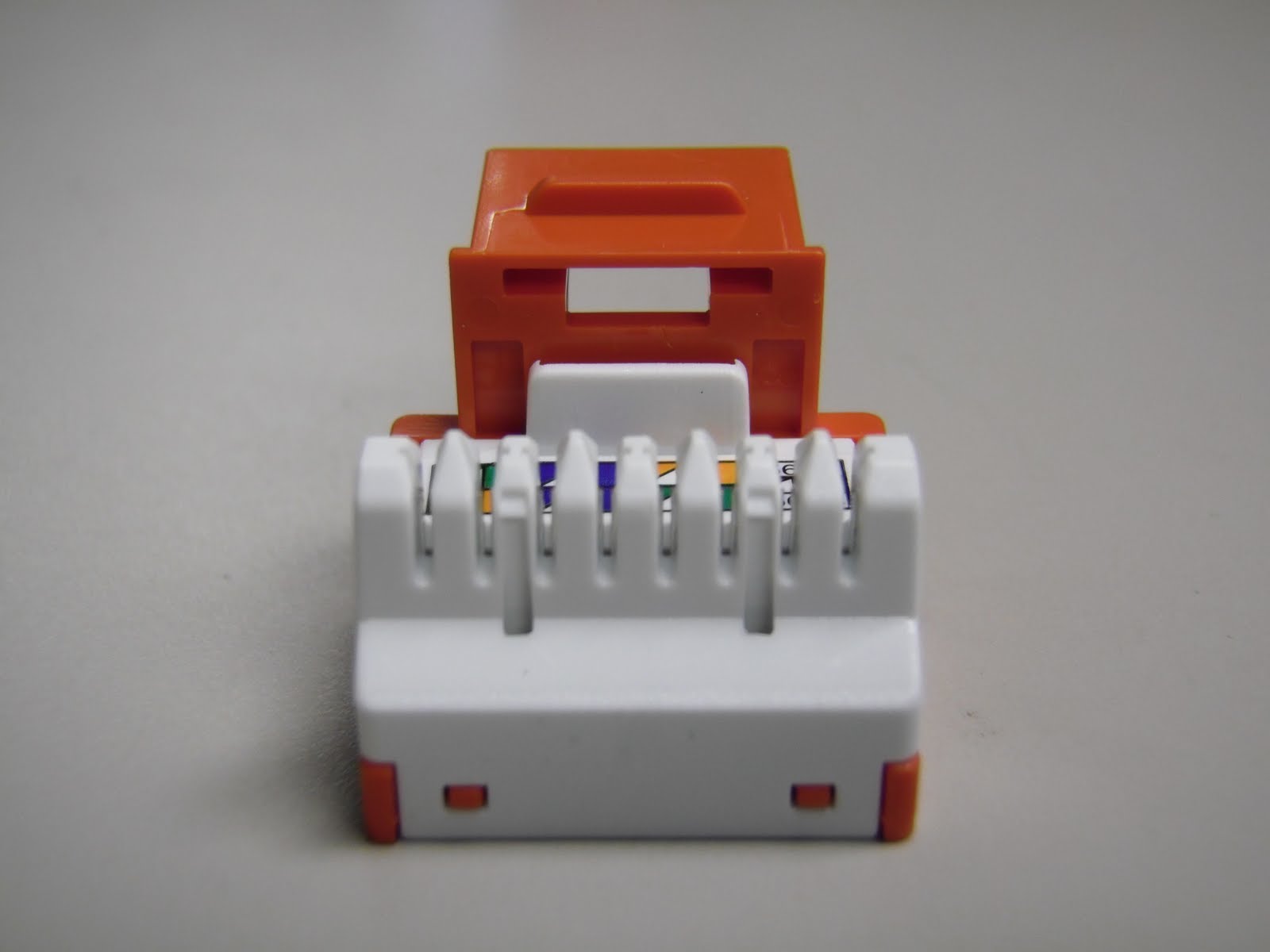
Now were ready to lace up the wires on your keystone jack. One the the nicest features of these jacks is the pointed 110s. This makes it much easier to lay the wires in, compared to the flat style some other keystone jacks have. Here's a close up view. You can also see it clearly shows the 568B and 568A color code on every jack.


Follow the color code on the side of the jacks. We suggest using 568B since it is the most common. Here is a picture of the 568B color code.


You can use your fingernail to seat the wires, or a utility knife. Make sure not to use the sharp side though, or you could cut through the wire jacket. Once all 4 pairs are laid down in the jack, it should look like this.


Make sure the jacket on your cable is as close to the keystone jack as possible. You don't want anymore than 1/2" of the wires exposed. Below is a picture of the WRONG WAY to do it.


Once the 4 pairs of wires are laced onto your Kwik Jack, slide the jack into the Kwik Tool
Updated 6-15-11: New Kwik Tool design
Here is what the Kwik Jack looks like inserted into the Kwik Tool

Once you have the Kwik Jack in the tool, simply squeeze down on the handle and release. This will punch down and cut all 4 pairs of wires. Remove the Kwik Jack from the tool. Here is a completed Cat5e/Cat6 Kwik Jack
Tip: You can also use a 110 punch tool to terminate the Kwik Jacks


Now, snap on the included dust cover and you're done.


Now let's watch Mercy demonstrate this process on video:


We hope our article on How To Terminate Cat5e/Cat6 Kwik Jacks Using the Kwik Tool was helpful. For more information, or to order any of these items, visit our website at Discount-Low-Voltage.com

Related Posts:

Wednesday, November 25, 2009

How To Punch Down Cat5e/Cat6 Keystone Jacks

How to punch down a Cat5e/Cat6 keystone jack, step-by-step instructions. I took a bunch of pictures along the way to better explain the process, and to let you see just what it should look like. If you want to see the process of punching down a Cat5e or Cat6 jack on video, scroll to the bottom of this post. To get started, let's take a look at what tools you will need:

Electricians Scissors (regular household scissors will work also)

Wire Stripper (you can use electricians scissors if you don't have any wire strippers)


Now that we have all the tools, let's punch down some keystone jacks.

First, strip off at least 1 inch of jacket on your Cat5e/Cat6 cable. Make sure not to cut into the wires. If you do, you'll need to start over. This picture shows what the two cables look like side by side. The Cat6 cable is larger (bottom) due to the separator between the pairs.

Cut off the ripcord

If you using Cat6 cable, it should have a separator. Cut that off as well. Simply pull the 4 pairs of wire back and cut it off

Now were ready to lace up the wires on the keystone jack. This style of jack is very user friendly and great for beginners or professional installers. You can see 110s are in a single row and that they are pointed, making it easier to lace the wires down

Let's go ahead and wire these keystone jacks following the 568b Wiring Diagram

You can see the keystone jack has the color code for 568A and 568B on the jack. They are very similar, but 568B is most commonly used nowadays.
 

Once all the wires are laid down, your keystone jack should look like this. Notice how I left the pairs of wire twisted. I was able to do this because of the pointed ridges on the jack, making it much easier to set the wires in. Many other styles of jacks out there have a flat surface, requiring you to untwist all 4 pairs of wire down to the jacket. Also notice how the jacket of the cable is right up against the keystone jack. You don't want any more than 1/2" of the wires exposed.

Once you have the wires laced in correctly, set your keystone jack in a jack palm tool. If you don't have one of these available, you can punch the jack down on the ground or a desk, but I suggest putting a piece of cardboard down to prevent the jack from slipping out when you punch them down. I would strongly suggest AGAINST using your hand to punch down jacks without the use of this tool. The jack can slip out and the tool will cut right through your hand. Not a pretty site

Now, take your punch tool and find the side that says "CUT". You want to make sure the tool faces the correct way, or you'll cut the wrong side of the wires off. This is how your tool should look when punching down the jack. Notice the pointy tip on the left side of the 110s

 A close up view of the 110 blade shows this better

Once the punch down tool is positioned correctly, push down firmly until you feel it pop. You should see the wire cut off. If it doesn't, you may need to do it once more. Here you can see I terminated the brown pair

Repeat with the other 3 pairs of wires and you have a completed keystone jack. It will look like this. Note how the jacket is very close to the jack. You want to make sure you keep it as close as possible.

Here is a picture or the WRONG way. The cable jacket is stripped too far back, exposing more than 1/2" of the wires


Lastly, press the clear dust cover on your jack and your DONE


Now let's watch it on video


New Tool Available!

Want to terminate Cat5e/Cat6 jacks quicker? Try the Kwik Tool and Kwik Jacks, available at Discount-Low-Voltage.com. Read the instructions for Terminating Cat5e/Cat6 Kwik Jacks here. The Kwik Tool removed the need for buying the punch down tool, 110 blade and palm tool. Safer, faster and less expensive. Call us for details on how to get a free Kwik Tool today! (888) 797-3697

We hope you enjoyed this article on how to punch down Cat5e/Cat6 keystone jacks. Feel free to leave comments or suggestions in the comment box below and thanks for visiting.

Related Posts:

Still have questions? You can reach us at (888) 797-3697
Visit our website at Discount-Low-Voltage.com to order any of the items seen in this article.